Telling an athlete "your elbow drops" competes with everything else in their head. A green line on the freeze-frame of their own body doesn't. Drawing on video — telestration — turns feedback from a claim into something the athlete can see, and an angle measured in degrees turns "bend more" into "you're at 95°, we want 110°".
The markup toolbox
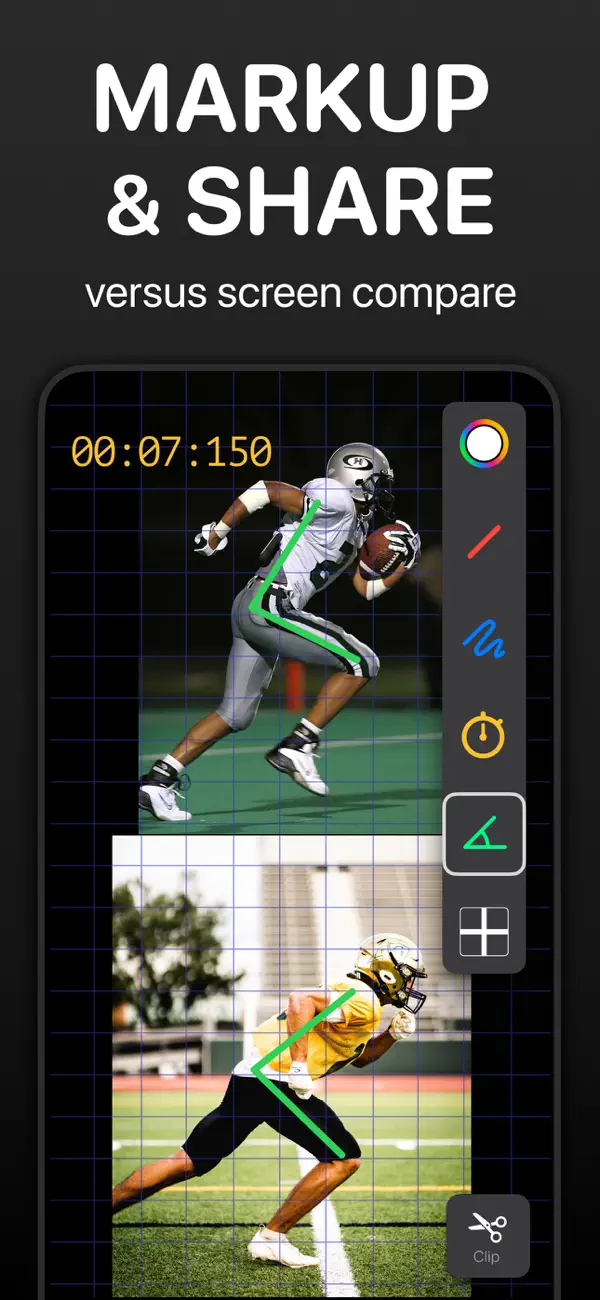
Tap Markup in Coach Video Analysis and the toolbox slides in:
- Line — straight reference lines: swing planes, bar paths, spine angles, start lines.
- Freehand — circle the thing you're talking about.
- Angle — drop three points (say hip–knee–ankle) and the angle appears in degrees. The points stay draggable, so you can fine-tune each vertex on the zoomed picture.
- Horizontal / vertical reference lines — one-tap level and plumb lines for checking posture against true horizontal or vertical.
- Stopwatch — an on-video clock widget anchored to a start moment; as the video plays it counts elapsed video time. Place it at foot strike and read the ground-contact time right on the picture.
- Tempo (sequence) — mark up to three timestamps in the movement and get the total time and the ratio between phases, like 2.0 : 1.0. The classic use: backswing-to-downswing tempo.
- Six colors (red, green, blue, white, black, gold), per-tool color memory, undo, clear, and hide. There's also a PencilKit mode with Apple's pen tools if you prefer them.
Mirror your drawing onto the second video
When two videos are loaded, enable mirror drawing and every stroke you make on one video is reproduced on the other at the same spot. Draw the target hip line once and both the athlete's clip and the reference clip carry it — the comparison stays honest because both sides are measured against the identical line. (In stacked layout the mirroring flips across the horizontal axis, in side-by-side across the vertical, so the line lands where you'd expect.)
Angles that mean something: three rules
- Measure on the right frame. A knee angle mid-flight and one frame later at touchdown are different numbers. Use frame-by-frame stepping to land on the instant you actually care about, then measure.
- Camera position is part of the measurement. 2D angles are only comparable when the camera angle matches. Film from the same spot every session, perpendicular to the plane of the movement.
- Compare numbers, not impressions. The same three-point angle measured on last month's video and today's — from the same camera position, on the same event frame — is a progress metric you can write down.
Drawings ride along into every export
Markups aren't just for the live screen. They're included when you Clip a highlight ("Save Clip with Drawing"), when you export video or GIF, in kinogram and chronogram frames, on the TV over AirPlay or HDMI, and in Annotate recordings — where the app captures the screen and your voice into an MP4, so the athlete replays your whole explanation, lines and all.
 Mark up video in Coach Video Analysis
Lines, freehand, three-point angles in degrees, level and plumb references, an on-video stopwatch, tempo ratios, six colors, mirrored drawing across two synced videos, and voice-over recording with Annotate. iPhone, iPad, and Mac — free to download.